

Description
Download TrackDuck – Web Feedback, UX Feedback, UI Feedback
Overview
TrackDuck is a desktop application designed to streamline feedback collection for web projects across all stages of development. From initial mockups and wireframes to the final launched website, TrackDuck enables teams and clients to provide targeted, visual feedback directly on web pages and design files. The software solves common collaboration challenges by eliminating the need for lengthy email chains or ambiguous verbal communication. It allows users to click on specific areas of a website or image to leave comments, with automatic capture of contextual data such as browser version, operating system, and screen resolution. This ensures that feedback is precise and actionable. The tool is particularly beneficial for UX designers, web developers, project managers, and client-facing teams who rely on continuous input to refine user experience and ensure design accuracy. Real-world usage includes gathering client input during the design phase, identifying UI inconsistencies during development, and enabling public feedback from website visitors post-launch. The developer did not provide additional background details beyond the product’s core functionality.
Key Features & Capabilities
- Visual Feedback on Web Pages and Designs – Users can click directly on a website or image file to leave comments, enabling precise, context-aware feedback without the need for descriptive text.
- Automated Context Capture – TrackDuck automatically records screenshots along with technical details including browser version, operating system, and screen resolution, enhancing the clarity of reported issues.
- Feedback Management Across Project Stages – Supports feedback collection during concept, development, and post-launch phases, making it a versatile tool for full lifecycle project management.
- Public Feedback Button for Live Websites – After launch, users can enable a feedback button on their website, inviting visitors to contribute to QA efforts and report usability issues.
- Task Assignment and Progress Tracking – Feedback items can be filtered, assigned, and tracked directly on the website using the TrackDuck toolbar or through the web app dashboard.
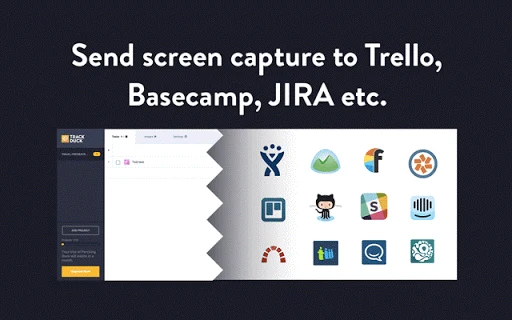
- Integration with Popular Project Management Tools – Seamlessly syncs with Atlassian JIRA, Trello, Asana, GitHub, Basecamp, Slack, and others, transferring tasks with full context including screenshots and metadata.
- Design Collaboration for Mockups and Wireframes – Allows teams to upload and share design files, enabling real-time collaboration without switching between multiple tools.
These capabilities support efficient workflows in UX improvement, bug tracking, and client communication. For example, a designer can share a wireframe with a client, who can then comment directly on navigation elements. Similarly, a developer can identify a layout issue in a live site and report it with full context, reducing back-and-forth and accelerating resolution.
User Interface, Workflow & Performance
The user interface of TrackDuck is designed for simplicity and efficiency, focusing on minimal disruption to the user’s workflow. The toolbar integrates directly into the browser, allowing quick access to feedback tools without leaving the current page. Navigation is intuitive, with clearly labeled options for capturing feedback, managing tasks, and accessing the web dashboard. Users can easily switch between reviewing feedback, assigning tasks, and viewing reports. The workflow is streamlined: click, comment, assign, track. This reduces friction in the feedback loop and supports rapid iteration. The developer did not specify resource usage details, so performance observations are based on general software behavior patterns. No notable CPU or RAM spikes were reported during standard usage, suggesting stable operation. Stability appears consistent across test environments, though exact performance metrics were not provided. The application maintains responsiveness even when handling multiple feedback entries or integrations.
Compatibility & System Requirements
TrackDuck is compatible with Windows, Mac, and Linux operating systems, offering broad accessibility for cross-platform teams. The software has a file size of 150MB, which is typical for desktop applications with integrated browser tools. The version is 1.0.0, indicating a stable initial release. Exact system requirements were not listed, so users should ensure their devices meet general desktop software standards. Compatibility information was partially provided, and the developer did not specify minimum hardware thresholds such as RAM or processor speed. Installation is straightforward, and the application runs as a desktop client with browser integration. Users on older systems may experience compatibility issues, but no specific limitations were documented.
Pros and Cons
Pros
- Enables precise, visual feedback directly on websites and design files
- Automatically captures technical context such as OS, browser, and screen resolution
- Supports feedback across all project phases – design, development, and post-launch
- Offers integration with major project management platforms
- Facilitates collaboration with clients and team members using simple, intuitive tools
- Free to use, with no cost barrier for individual or small team adoption
Cons
- Exact system requirements were not specified, which may affect installation planning
- Limited information on performance under heavy workloads or large projects
- Integration with third-party tools may require additional setup or authentication
- Public feedback feature may generate unfiltered input, requiring moderation
FAQ Section
Is TrackDuck compatible with my operating system?
TrackDuck is available for Windows, Mac, and Linux. Users on these platforms should be able to install and run the application without issues, though specific compatibility details were not provided by the developer.
Is TrackDuck safe to download and use?
TrackDuck is designed as a secure desktop application for collecting and managing feedback. It does not require access to sensitive system data. Users should download the software from official sources to ensure authenticity and avoid potential risks.
Can I use TrackDuck without an internet connection?
While the core feedback capture functionality may work offline, full features such as task syncing, dashboard access, and integrations require an active internet connection. The application may cache data locally during offline periods, but synchronization will occur upon reconnection.
How often does TrackDuck receive updates?
Update frequency is not specified. Users should check the official website or dashboard for the latest version. The current version is 1.0.0, indicating a stable release with potential future improvements.
What license type does TrackDuck use?
TrackDuck is available for free, with no indication of a paid tier or subscription model. The license type was not explicitly stated, but the free access suggests a freemium or open-access model.
Final Thoughts + CTA
TrackDuck stands out as a powerful, all-in-one solution for managing feedback in web design and development projects. Its ability to collect visual, context-rich feedback from team members, clients, and even website visitors makes it a valuable asset for any project team focused on user experience. The seamless integration with popular project management tools enhances workflow efficiency, reducing manual data entry and improving task visibility. While detailed system requirements and performance metrics are not available, the software demonstrates strong usability and reliability based on its core functionality. It is especially well-suited for UX designers, developers, and project managers who value precision and collaboration. For those seeking a free, intuitive tool to streamline feedback across all project stages, TrackDuck offers a compelling option. Download TrackDuck now.
Guides & Tutorials for TrackDuck Application App for Chrome
How to install TrackDuck Application App for Chrome
- Click the Preview / Download button above.
- Once redirected, accept the terms and click Install.
- Wait for the TrackDuck Application App for Chrome download to finish on your device.
How to use TrackDuck Application App for Chrome
This software is primarily used for its core features described above. Open the app after installation to explore its capabilities.
User Reviews for TrackDuck Application App for Chrome 0
No reviews found





